Diving Deep into Node.js Buffers
How Node.js stores and transmits binary data with Buffer, including allocation APIs, memory behavior, performance, and the internal 8 KB slab pool.
Introduction
In Node.js Buffer class is the core library. It brings a way for Node.js to store raw data, allowing Node.js to handle binary data. The raw data is stored in the instance of the buffer class. A buffer is similar to an array of integers, but it corresponds to a piece of raw memory other than the v8 heap memory.
Way to create a new Buffer
At the start of the Node process Buffer is put into the global object, so doesn’t need explicit require.
> console.log(Buffer)
{ [Function: Buffer]
  poolSize: 8192,
  from: [Function],
  alloc: [Function],
  allocUnsafe: [Function],
  allocUnsafeSlow: [Function],
  isBuffer: [Function: isBuffer],
  compare: [Function: compare],
  isEncoding: [Function],
  concat: [Function],
  byteLength: [Function: byteLength],
  [Symbol(node.isEncoding)]: [Function] }
undefined
>
Starting from Node v6 we can create a new buffers from:
-
Buffer.from() -
Buffer.alloc() -
Buffer.allocUnsafe()
Buffer.from() and Buffer.alloc() get the original buffer, replace the data so they are safe.
Buffer.from
/**
 * Functionally equivalent to Buffer(arg, encoding) but throws a TypeError
 * if value is a number.
 * Buffer.from(str[, encoding])
 * Buffer.from(array)
 * Buffer.from(buffer)
 * Buffer.from(arrayBuffer[, byteOffset[, length]])
 **/
Buffer.from = function from(value, encodingOrOffset, length) {
  if (typeof value === 'string')
    return fromString(value, encodingOrOffset);

  if (isAnyArrayBuffer(value))
    return fromArrayBuffer(value, encodingOrOffset, length);

  ......

  const valueOf = value.valueOf && value.valueOf();
  if (valueOf != null && valueOf !== value)
    return Buffer.from(valueOf, encodingOrOffset, length);

  var b = fromObject(value);
  if (b)
    return b;

  ....
};ArrayBuffer: Create FasterBuffer directly using ArrayBufferString: Less than 4k use 8k pool, more than 4k callbinding.createFromString()Object: Less than 4k use 8k pool, more than 4k callcreateUnsafeBuffer()Buffer.allocUnsafe(): Less than 4k use 8k pool, more than 4k callcreateUnsafeBuffer()
Important Read from offical documentaion Buffer.from(), Buffer.alloc(), and Buffer.allocUnsafe()
Buffer.alloc
/**
 * Creates a new filled Buffer instance.
 * alloc(size[, fill[, encoding]])
 **/
Buffer.alloc = function alloc(size, fill, encoding) {
  assertSize(size);
  if (size > 0 && fill !== undefined) {
    // Since we are filling anyway, don't zero fill initially.
    // Only pay attention to encoding if it's a string. This
    // prevents accidentally sending in a number that would
    // be interpreted as a start offset.
    if (typeof encoding !== 'string')
      encoding = undefined;
    return createUnsafeBuffer(size).fill(fill, encoding);
  }
  return new FastBuffer(size);
};
Why we need buffer ?
Consider the following two case:
1. Using the large string to send as response
const http = require('http');
let hello = '';
for (let i = 0; i < 100000; i++) {
  hello += 'h';
}

http
  .createServer(function(req, res) {
    res.writeHead(200);
    res.end(hello);
  })
  .listen(8080);
Doing ab test on the above
ab -n 50000 -c 200 http://localhost:8080/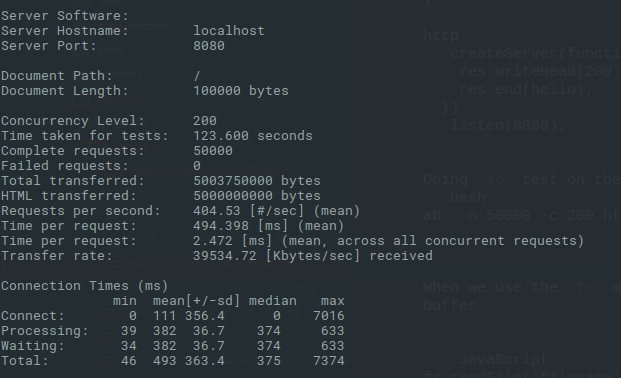
2. Using the buffer transmission
const http = require('http');
let hello = '';
for (let i = 0; i < 100000; i++) {
  hello += 'h';
}

const buf = Buffer.from(hello);
http
  .createServer(function(req, res) {
    res.writeHead(200);
    res.end(buf);
  })
  .listen(8080);
ab test result
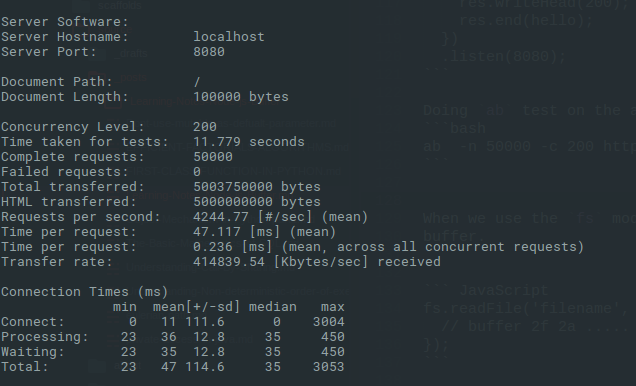
Comparing the two result we can see that the binary data transmission rate is much faster, and less time consuming too.
Node.js internally uses Buffer at lots of places. For example
When we use the fs module to read the contents of the documents, it returns a buffer.
fs.readFile('filename', function(err, buf) {
  // buffer 2f 2a .....
});
In the case of net or http module, the data event parameters are a buffer.
var bufs = [];
conn.on('data', function(err, buff) {
  bufs.push(buff);
});
conn.on('end', function(err) {
  var buff = Buffer.concat(bufs);
})
Since the memory space occupied by the buffer object is not calculated in the node.js process memory, We often use Buffer to store data that requires a lot of memory as node.js process has a maximum memory limit as follow in general.
- 32bit - 512MB
- 64bit - 1.4GB
Buffer 8k Pool slab
lib/buffer.js the buffer slab size is Buffer.poolSize = 8 * 1024; 8k. When the user calls for new Buffer,
function allocate(size) {
  if (size <= 0) {
    return new FastBuffer();
  }
  if (size < (Buffer.poolSize >>> 1)) { //<4k
    if (size > (poolSize - poolOffset))
      createPool();
    var b = new FastBuffer(allocPool, poolOffset, size);
    poolOffset += size;
    alignPool();
    return b;
  } else {
    return createUnsafeBuffer(size);
  }

  function fromString(string, encoding) {
  var length;
  ...
  if (length >= (Buffer.poolSize >>> 1))
    return createFromString(string, encoding);

  if (length > (poolSize - poolOffset))
    createPool();
  var b = new FastBuffer(allocPool, poolOffset, length);
  const actual = b.write(string, encoding);
  if (actual !== length) {
    // byteLength() may overestimate. That's a rare case, though.
    b = new FastBuffer(allocPool, poolOffset, actual);
  }
  poolOffset += actual;
  alignPool();
  return b;
}
}
allocate() and fromString() check for two cases
- Less than
4k- check8kpool slab remaning capacity. - Greater than
4k- and if more than remaining capacity Directly create a new 8k pool.
function createPool() {
  poolSize = Buffer.poolSize;
  allocPool = createUnsafeArrayBuffer(poolSize);
  poolOffset = 0;
}
createPool();


function alignPool() {
  // Ensure aligned slices
  if (poolOffset & 0x7) {
    poolOffset |= 0x7;
    poolOffset++;
  }
}
8k Slab are reclaimbed by the v8 if all other references have become null. createPool() interanally calls createUnsafeArrayBuffer() to get the corresponing instance of ArrayBuffer and because ArrayBuffer is
fixed-length raw binary data buffer
it’s insecure, and there is danger of leakage of sensitive information in memory.
Originally published at blog.ankuranand.com.